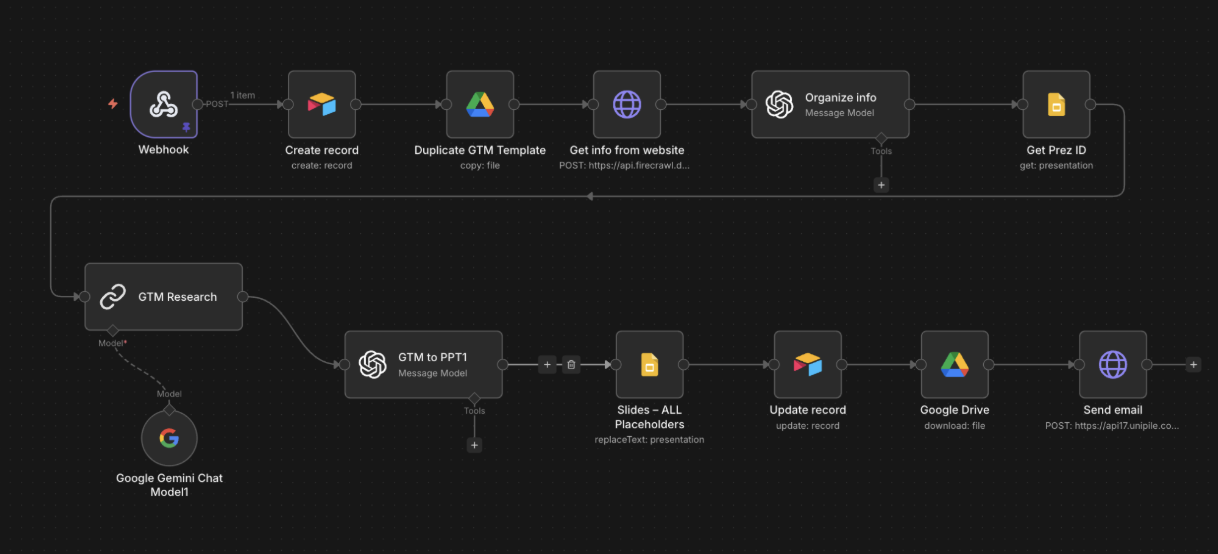
How it works
Form to webhook
Form submit fires the webhook. A new Airtable tracking record is created with email, company, website, and a deck link, so we always have a trace if anything fails.
Duplicate the GTM template
Google Drive copies the hand-designed master deck. Each request gets its own file, named after the company.
Scrape with Firecrawl
Firecrawl fetches the homepage and key product pages, returns clean structured content.
Organise with Gemini
Gemini turns scraped content into structured GTM signals: positioning, ICP, competitive angles, talking points.
Populate slide placeholders
Slides API replaces every placeholder in the duplicated deck with the structured output. Branded design preserved.
Update record + email
Airtable record updated with the final deck link. Email sent to the requester via UniPile (or Gmail) with the deck attached. Under 5 minutes per company.
What it does
Two ways in. The public form on the landing page asks for company name, website, and work email. An internal Airtable form covers cases where I just need one research, fast. Either way the same pipeline kicks off, and a finished deck lands in the requester's inbox.
Company analysis time: from around 2 hours of manual work down to under 5 minutes per prospect.
Why a template-and-populate pattern
Writing PPTs from scratch is expensive to maintain. Duplicating a hand-designed Google Slides template and filling placeholders keeps the visual design sharp without a designer in every iteration. Edit the template once and every new deck picks up the change.