How it works
Trigger on meeting close
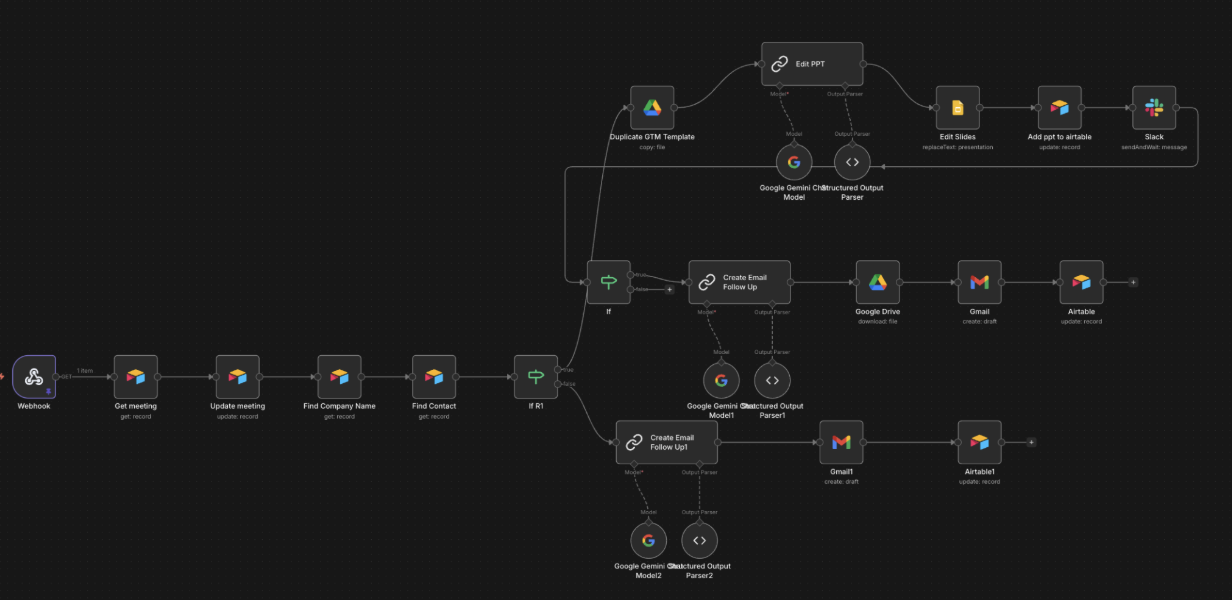
Webhook fires when the meeting record is updated after the call. Pulls the meeting, the company, the contact.
Reads the transcript
Gemini reads what was actually said and writes a structured summary: challenges, signals, how we help, next steps.
Branch on transcript
Transcript present: full deck path. Transcript missing: lighter email-only follow-up. Both end with a Gmail draft.
Slide deck built
The follow-up Slides template is duplicated. Gemini drafts the four sections, the Slides API fills the placeholders.
Gmail draft + deck attached
Gemini writes a personalised email referencing the discussion. The deck is downloaded from Drive and attached to the draft.
One click to send
Airtable record updated with deck link and draft status. Read, tweak, send. 30 minutes saved per call.
Why split from the meeting prep flow
Two reasons. Different trigger (meeting status update vs. booking), different destination (Slides + Gmail vs. Airtable record). Splitting also lets the prep flow stay fast, while the follow-up flow can take its time on long-form generation without holding up anything else.
Why a template-and-populate deck
Same logic as the GTM Research flow: hand-design the visual once in Slides, fill placeholders programmatically. The decks read as bespoke without anyone touching them. Edit the template when the message evolves, every new follow-up picks up the change.